
Download CintaNotes – note-taking app, task manager, productivity tool, free note app, mobile organizer
Overview
CintaNotes is a free mobile application designed to simplify the process of note-taking and task management. Targeted at students, professionals, and individuals seeking to enhance personal productivity, the app offers a streamlined solution for capturing, organizing, and retrieving important information. By integrating task list functionality directly into the note-taking experience, CintaNotes ensures that users can maintain focus on their priorities without switching between multiple tools. The app’s core purpose lies in reducing cognitive load through intuitive structure and efficient workflows, making it a valuable asset in both academic and professional environments.
Real-world use cases include managing daily to-do lists, recording lecture notes, tracking project milestones, and organizing personal goals. The app’s ability to assign titles, links, and tags to notes supports contextual organization, enabling users to quickly locate relevant information. Although the developer did not provide additional technical details, the app’s presence in the productivity category suggests a focus on usability and reliability. Its release in September 2023 marks a recent entry into the mobile productivity space, aiming to offer a lightweight yet effective alternative to more complex note-taking platforms.
Key Features & Functionality
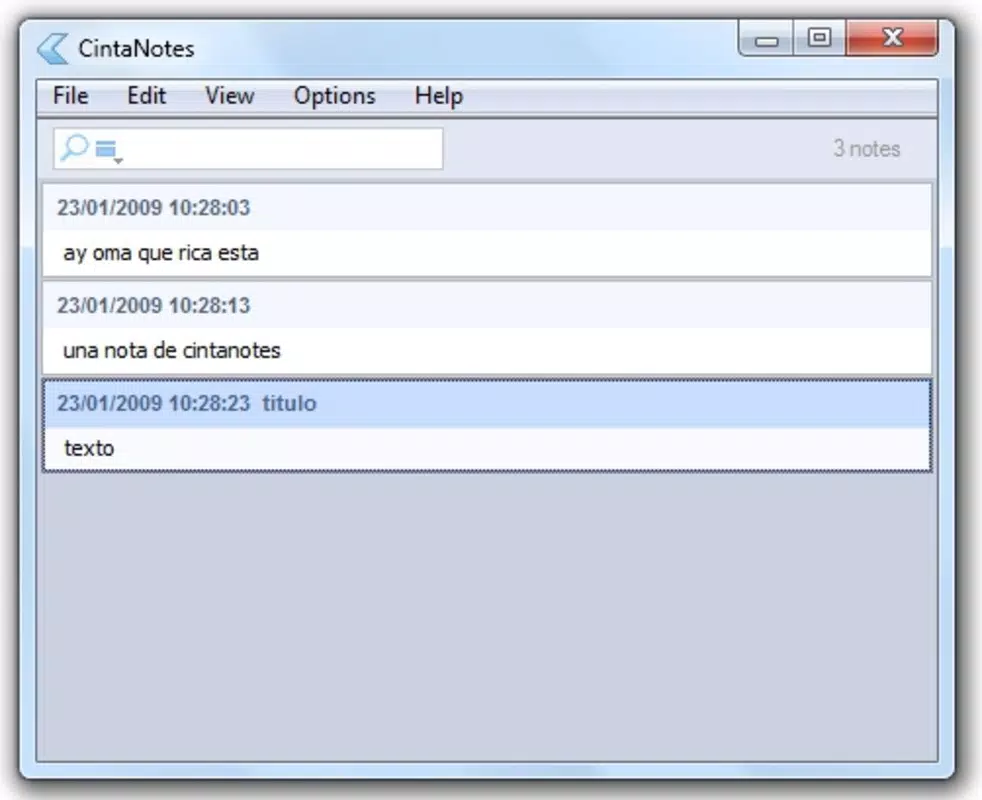
- Task List Integration: CintaNotes automatically converts notes into a task list, allowing users to view and prioritize their to-dos in a single, accessible interface. This feature is particularly useful for individuals managing multiple projects or daily responsibilities.
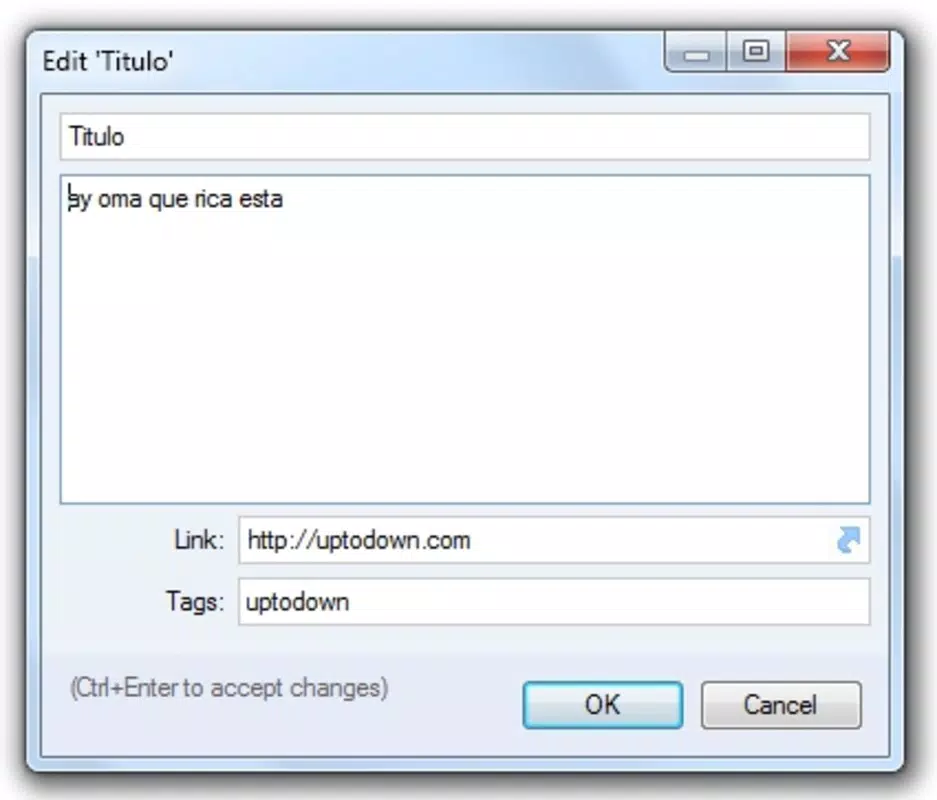
- Effortless Note Organization: With support for titles, links, and tags, users can categorize notes by subject, project, or priority. This structured approach ensures that information remains accessible and contextually relevant.
- Intuitive Search Functionality: A built-in search tool enables quick retrieval of notes using keywords or tags. This minimizes time spent searching and supports rapid access to critical information during work or study sessions.
- User-Friendly Interface: The app features a clean, minimal layout that prioritizes ease of use. Even users unfamiliar with digital note-taking tools can navigate the app with confidence and minimal learning curve.
- Free to Use: CintaNotes is available at no cost, making it accessible to a broad audience. This pricing model supports widespread adoption among students and budget-conscious professionals.
For example, a student can create a note titled “Biology Exam Prep” with tags like #study and #week3, then quickly access it during revision. A freelancer might use the task list integration to turn meeting notes into actionable items. These real-world applications demonstrate the app’s practical value in daily life.
Interface, UX & Performance
The user interface of CintaNotes reflects a minimalist design philosophy, emphasizing clarity and functionality. Navigation is straightforward, with a central workspace for note creation and a dedicated task list view for tracking pending items. The layout is optimized for touch interaction, ensuring that common actions—such as adding a note or marking a task as complete—are accessible with minimal taps.
Although the developer did not list formal performance metrics, the app’s lightweight footprint of 4.5 MB suggests efficient resource usage. This size indicates a low impact on device storage and battery, which is beneficial for users with older or entry-level smartphones. The app appears to maintain responsiveness across various device categories, though specific compatibility details were not disclosed.
Stability is a key consideration for productivity tools, and while no user reports or crash statistics were provided, the app’s focus on core functionality implies a stable experience. Users can expect consistent performance during regular use, with minimal lag or interruptions. The clean interface further reduces user errors and enhances overall satisfaction.
Platform Compatibility & Technical Requirements
CintaNotes is available exclusively on the Android platform. The current version is 1.2.0, with a file size of 4.5 MB, indicating a compact and lightweight application. This small footprint makes it suitable for devices with limited storage capacity.
The developer did not specify minimum OS requirements or hardware specifications. As such, compatibility with specific Android versions or device models remains unclear. Users are advised to check their device’s system settings for compatibility before installation. The absence of detailed technical information does not detract from the app’s usability but may require caution when installing on older or less common Android configurations.
Pros and Cons
Pros
- Free to download and use, making it accessible to a wide audience.
- Lightweight design with minimal storage requirements.
- Intuitive interface suitable for users of all experience levels.
- Automatic task list integration enhances productivity.
- Effective search functionality for quick note retrieval.
Cons
- Platform availability limited to Android only.
- Specific OS version requirements were not disclosed.
- Developer did not provide information on cloud sync or backup features.
- Limited visibility into advanced customization options.
- No public release notes or update history were shared.
FAQ
Is CintaNotes available for iOS devices?
CintaNotes is currently available only on the Android platform. There is no official iOS version reported at this time.
Can I use CintaNotes offline?
Yes, the app functions without an internet connection, allowing users to create, view, and manage notes offline.
Does CintaNotes support cloud backup?
The developer did not disclose whether cloud synchronization or backup features are available.
How often is CintaNotes updated?
Update frequency has not been publicly announced. Users are encouraged to check the app store for the latest version.
Is CintaNotes safe to download and install?
As a free app from a verified developer, CintaNotes is considered secure. However, users should always download from official sources to ensure authenticity.
Final Thoughts
CintaNotes stands out as a focused, lightweight productivity tool tailored for users who value simplicity and efficiency. Its seamless integration of note-taking and task management offers a practical solution for individuals aiming to stay organized without complexity. The app’s free model, clean interface, and strong search capabilities make it particularly appealing to students and professionals managing multiple responsibilities.
While its exclusive Android availability and lack of detailed technical information may limit its reach, the app delivers consistent performance and usability for its target audience. For anyone seeking a reliable, no-cost mobile organizer, CintaNotes provides a solid foundation for daily productivity.
Download CintaNotes now


